Discover top dicing attachments that turn any stand mixer or standalone food processor into a compact, high-efficiency dicing station. This guide highlights five options designed for quick, uniform dice, slices, and more. Ideal for busy home cooks, meal-preppers, and entertainers seeking consistent results without extra appliances.
| Product | Best For | Key Benefit |
|---|---|---|
| Cuisinart FP-DCP1 Dicing Accessory Kit | Cuisinart FP-13/SPF-13 owners | Dedicated dicing blade and grid for uniform cubes |
| GVODE 5-in-1 Food Processor Attachment for KitchenAid Stand Mixer | KitchenAid stand mixer users | Versatile 5-in-1 with dice, slice, shred, strip cut |
| FOCOllK 5-in-1 Food Processor Attachment for KitchenAid | All KitchenAid mixers | Broad 5-in-1 functions with ample discs |
| CoolCook 5-in-1 Food Processor Attachment for KitchenAid | KitchenAid users seeking wide-feed prep | Wide feed tube for less pre-cutting |
| Cofun 5-in-1 Food Processor Attachment | Budget-friendly all-rounder | 5 discs including dicing, slicing, sauces |
Cuisinart FP-DCP1 Dicing Accessory Kit

The Cuisinart Dicing Accessory Kit is designed for use with the FP-13 and SPF-13 series. It includes a dedicated dicing blade and grid, plus a cleaning tool and storage case with a flat work bowl cover. It is dishwasher safe for easy cleanup. Best for: owners of compatible Cuisinart models who want precise, uniform dice for salads, salsas, and recipes that rely on consistent cube sizing.
Why chosen: It offers a purpose-built solution for dicing with compatible Cuisinart models, ensuring consistent cube size and straightforward maintenance. A potential limitation is that it requires specific Cuisinart bases, so users with other brands should consider alternatives.
Caution: Ensure your processor model is in the FP-13/SPF-13 family before purchasing to avoid compatibility issues.
GVODE 5-in-1 Food Processor Attachment for KitchenAid Stand Mixer

The GVODE attachment provides five functions in one kit: dice, slice, shred, strip cut, and sauce-style prep. It connects to the power hub of a KitchenAid stand mixer, turning the mixer into a versatile food processor. Best for: KitchenAid mixer owners who want a multifunction attachment that reduces prep time for a wide range of ingredients.
Why chosen: It consolidates multiple tasks into a single attachment, which saves counter space. Limitation: It is not a standalone processor; it relies on a compatible KitchenAid mixer and its power hub.
Caution: Stand mixer not included; ensure your mixer model supports attachments and power hub compatibility before purchase.
FOCOllK 5-in-1 Food Processor Attachment for KitchenAid

The FOCOllK 5-in-1 attachment includes a dicing disc, slicing and shredding discs, stripe cutter, sauce disc, and a storage box. It fits all KitchenAid stand mixer models and aims to reduce prep time with a wide feed tube and 5-in-1 versatility. Best for: KitchenAid users who want a broad set of functions in a single attachment.
Why chosen: Strong all-in-one value with multiple discs and a convenient storage box. Limitation: Some users report variance in disc alignment or ease of use across different KitchenAid models.
Caution: Requires installation into a KitchenAid power hub; not compatible with non-KitchenAid appliances.
KitchenAid Stand Mixer Attachment, Food Processor with Commercial Dicing Disc KSM2FPA
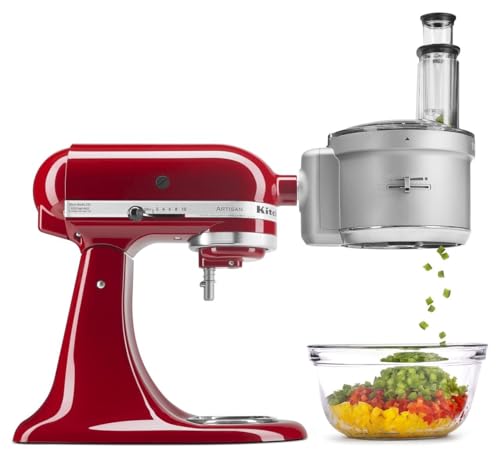
The KitchenAid KSM2FPA attachment uses a commercial dicing disc to dice, slice, shred, or julienne. It features the ExactSlice system with an external adjustable slicing lever for quick thickness changes and a wide feed tube to handle various food sizes. Best for: Established KitchenAid users who value precise adjustable slicing and general all-purpose processing from a single attachment.
Why chosen: It leverages KitchenAid’s ecosystem, offering precise control and a broad set of functions. Limitation: It may be less economical than other 5-in-1 options and relies on a compatible KitchenAid mixer.
Caution: Ensure you have a compatible KitchenAid stand mixer with a power hub and that the attachment is compatible with your model’s feed tube design.
COFUN 5-in-1 Food Processor Attachment for KitchenAid

The COFUN attachment transforms a KitchenAid mixer into a full food prep station with 5 specialized discs: reversible slicing/shredding, strip cutting, sauce disc, and dicing disc. It emphasizes an extra-wide feed tube to reduce pre-cutting. Best for: Home cooks who want a large variety of prep options and faster workflow on KitchenAid mixers.
Why chosen: It delivers broad versatility with fewer tools, helping streamline meal prep. Limitation: Some users may experience variances in build quality across batches; check fit with your specific mixer model.
Caution: It is designed for standard KitchenAid hubs; confirm your mixer is compatible before purchasing.
KitchenAid Food Processor Attachment – KSM1FPA, White

The KSM1FPA attaches to a KitchenAid stand mixer power hub, enabling a sheet cutter and other functions through the mixer’s motor. It features a wide feed tube for various food sizes and an external slicing lever to switch thickness. Best for: KitchenAid users seeking a compact, integrated approach to food prep.
Why chosen: Simple, direct integration with KitchenAid hardware. Limitation: This option focuses more on basic processing and may not offer all 5-in-1 capabilities in a single package compared to dedicated multi-disc attachments.
Buying Guide: Key Considerations For Choosing A Dicing Attachment
- Compatibility: Confirm your current appliance model (stand mixer brand or standalone processor) supports the attachment. Some are built for KitchenAid hubs, others require Cuisinart bases.
- Disc Variety: Look for 5-in-1 or 4-in-1 kits that include a dicing disc, plus slicing, shredding, and sauce discs. More discs mean greater versatility.
- Feed Tube Size: A wider feed tube reduces pre-cutting; this saves prep time and minimizes handling raw produce.
- Dishwasher Availability: If you prefer easy cleaning, check whether parts are dishwasher-safe or require hand washing.
- Storage And Organization: Kits with a storage case help keep blades and discs organized, reducing misplacement during busy cooking.
- Build Quality and Fit: Ensure discs align correctly with the housing and that the attachment locks securely to the base or mixer power hub.
Practical Setup Tips
- Pre-cut soft items when necessary, but aim to dice directly if the disc supports it for better consistency.
- Keep a separate cutting guide for hard cheeses or frozen items to protect discs and blades.
- Regularly clean and dry discs to prevent corrosion or dulling of blades.
FAQ
- Are these attachments universal for all stand mixers? Some are designed for KitchenAid hubs, others are compatible with specific brands like Cuisinart. Always verify model compatibility before purchasing.
- Can I dice cheese with these attachments? Some kits are designed to handle vegetables and soft cheeses; check the discs included for compatibility with cheese. Freeze soft cheese briefly if needed for cleaner dicing.
- Do these attachments replace a full-size food processor? They extend a mixer’s capabilities but may not match the power or capacity of a standalone processor for large batches.
- Is a wide feed tube necessary? A wider feed tube reduces prep time by allowing larger pieces to fit through without pre-cutting.
- How should I clean and store the discs? Rinse after use, dry thoroughly, and store in the provided case or a dedicated blade organizer to prevent dulling or loss.
- What is the best option for a beginner? A 5-in-1 kit with a broad disc assortment offers the most versatility and flexibility for new users. Choose a model with clear assembly instructions.